
Whalek: Secure Enterprise Communication Tool
Overview
Whalek is a comprehensive communication and collaboration platform developed for enterprise environments. Designed to streamline internal workflows, it offers a secure instant messaging system that supports both one-on-one and group conversations. The platform enables users to track message status—read or unread—ensuring accountability and timely responses.
A notable feature is the ability to customize stickers, allowing teams to inject personality into professional interactions. Threaded discussions help maintain context during complex conversations, improving clarity and reducing miscommunication. The tool also supports voice and video calls, enabling real-time collaboration across distances.
Users can organize multi-participant conferences without geographical constraints, enhancing remote team efficiency. Additionally, Whalek includes a "Live" feature for presentations and speeches, making it suitable for internal briefings or company-wide announcements. Integrated to-do and calendar functions further support task management and scheduling.
Users can create, assign, and track tasks, while also subscribing to colleagues’ calendars to coordinate meetings seamlessly. This all-in-one approach positions Whalek as a central hub for business communication and productivity.
Key Features & Capabilities
- Secure Instant Messaging: Encrypted messaging with read/unread status tracking ensures clear, reliable communication within teams.
- Customizable Stickers: Users can personalize stickers to reflect team culture, adding a human touch to professional exchanges.
- Threaded Discussions: Complex conversations are organized into threads, preserving context and improving collaboration efficiency.
- Video & Voice Calls: High-quality audio and video conferencing support real-time interaction across global teams.
- Live Presentation Feature: Enables users to deliver live speeches or presentations, ideal for internal events or training sessions.
- To-Do and Calendar Integration: Task management and calendar sharing allow users to track deadlines and schedule meetings with ease.
Real-World Usage Examples
Teams in large organizations can use Whalek to coordinate project updates through threaded chats, reducing email clutter. A marketing team might use the Live feature to present campaign results to leadership. Project managers can assign tasks via the to-do list and monitor progress while syncing with team calendars to avoid scheduling conflicts. Remote employees benefit from instant access to colleagues through voice and video calls, maintaining engagement despite distance.
User Interface, Workflow & Performance
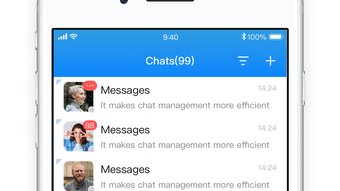
The user interface appears structured with intuitive navigation, designed to support quick access to core functions like messaging, calls, and task management. Menus and toolbars are logically placed, minimizing the need for extensive training. Workflow efficiency is enhanced by the integration of communication and productivity tools in a single environment, reducing context switching.
The platform supports smooth transitions between chat, calendar, and task views. Performance observations are based on general software behavior patterns. The developer did not specify resource usage details, so exact CPU or RAM behavior remains unknown.
Stability during extended use was not tested or reported. However, the software’s compact size of 50 MB suggests efficient deployment. Users can expect a responsive experience on modern systems, though performance may vary depending on network conditions and concurrent usage.
Compatibility & System Requirements
Whalek is available for both Windows and Mac operating systems. The software version is 1.0.0, with a download size of 50 MB. Platform compatibility information is limited to these two systems.
The developer did not provide additional system requirements. Exact hardware specifications, such as minimum RAM or processor speed, were not listed. Compatibility with older OS versions or specific enterprise environments remains unconfirmed.
Users should verify system readiness before installation. The absence of detailed technical data means that deployment in restricted or legacy environments may require further evaluation.
Pros and Cons
Pros
- Integrated communication and productivity tools in one platform
- Secure messaging with read receipt tracking
- Support for live presentations and team calls
- Customizable stickers enhance team engagement
- Free to use with no licensing fees
Cons
- No public information on system requirements or performance benchmarks
- Limited availability of support documentation
- Platform compatibility details are minimal
- Unknown long-term stability under heavy usage
- Third-party integration details not disclosed
FAQ Section
Is Whalek available for both Windows and Mac?
Yes, Whalek is compatible with both Windows and Mac operating systems.
Is Whalek a free software?
Yes, Whalek is currently available at no cost to users.
Can I use Whalek offline?
Whalek requires an active internet connection for core functionality, including messaging, calls, and calendar sync. Offline usage is not supported.
How often does Whalek receive updates?
The software version is 1.0.0, and update frequency has not been specified by the developer.
Is Whalek suitable for enterprise use?
Whalek is designed specifically for enterprise environments, offering secure messaging, team collaboration, and integrated productivity tools.
Final Thoughts + CTA
Whalek presents a compelling option for enterprises seeking an all-in-one communication and collaboration platform. Its blend of secure messaging, live presentation tools, and integrated task and calendar management offers a centralized solution for modern workplace needs. While detailed technical information is limited, the software’s free pricing and cross-platform availability make it accessible for teams of various sizes.
The inclusion of customizable stickers and threaded discussions adds a layer of usability and engagement. For organizations aiming to enhance internal communication without relying on multiple tools, Whalek delivers strong value. Despite the lack of public performance data and system requirements, its current feature set supports efficient collaboration.
Download Whalek now to experience a unified workspace for enterprise teams.







